Google Chrome 150 for Android adds dedicated back button and menu redesign
Google is rolling out a redesigned menu for Chrome on Android that includes a new dedicated back button and reconfigured interface shortcuts. These updates aim to improve navigation, particularly for users with large-screen devices like tablets and foldables.

Google has commenced the rollout of Chrome 150 for Android, delivering a comprehensive overhaul of the browser's three-dot menu. The update introduces a dedicated back button, finally achieving functional parity with the browser’s iOS iteration. While Android users have historically relied upon system-level swipe gestures or device navigation bars to retreat from a webpage, the new in-app control provides a secondary navigation method, particularly aimed at users navigating via tablets, foldables, or large-screen devices where physical reach may be less comfortable.
Menu Reconfiguration and Interface Adjustments
The addition of the back button to the top horizontal shortcut row has necessitated a broader reorganization of the browser’s interface. According to reporting from 9to5google and Android Gadget Hacks, the following changes are currently appearing for users:
Related media

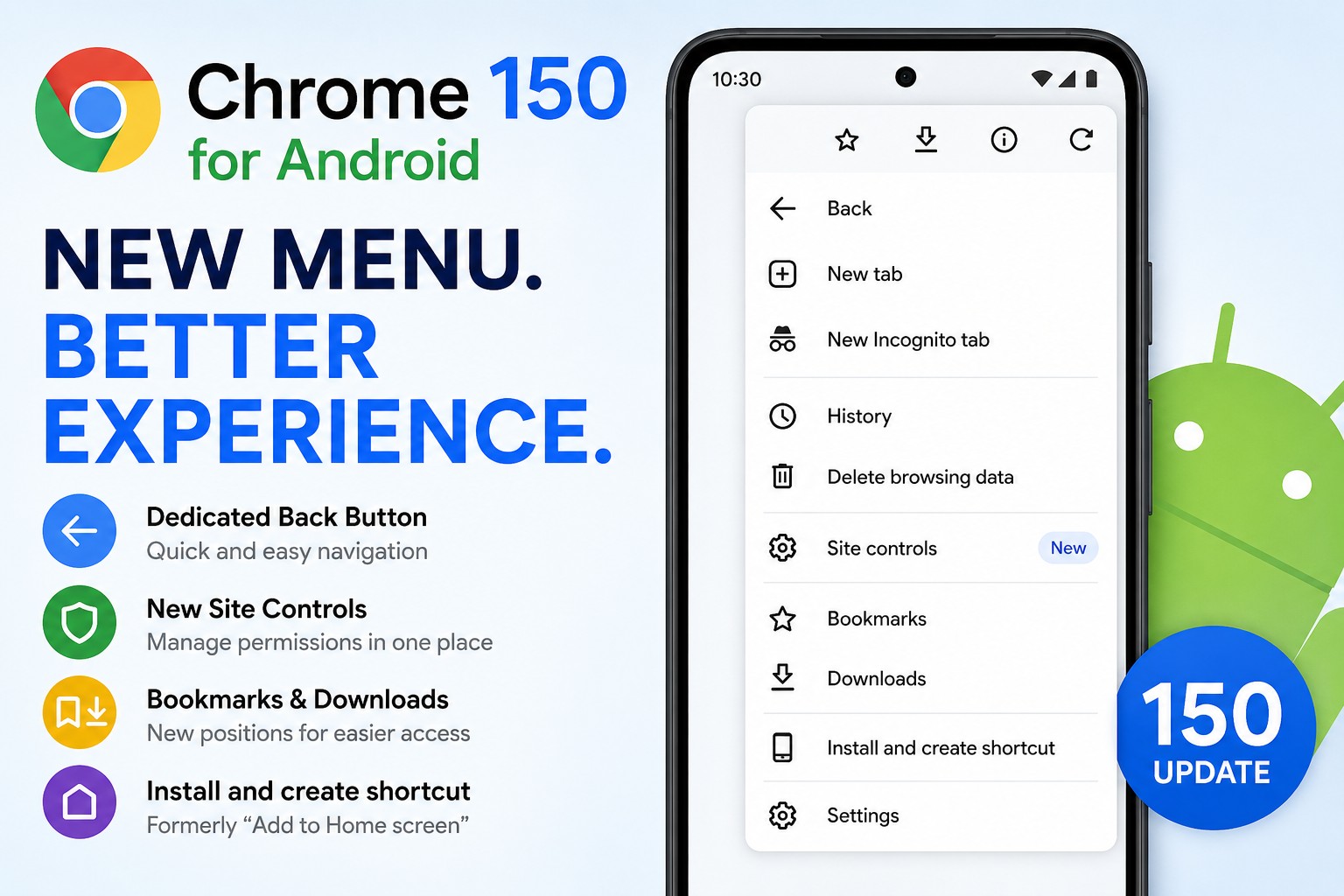

- Navigation Bar: The back button now sits symmetrically alongside the forward arrow. Previously, the forward arrow remained grayed out in the menu until a user had already performed a system-level navigation action.
- Site Controls: The former page information ("i") button has been removed from the header. These options — including permissions, security status, and cookie settings — are now consolidated into a new, scrollable list item labeled "Site controls."
- Shortcut Reorganization: To accommodate the header changes, the Bookmark and Download buttons have been shifted one position to the right.
- Renaming: The "Add to Home screen" option has been rebranded as "Install and create shortcut." This change is intended to clarify the browser's behavior, as the system now distinguishes between installing a Progressive Web App (PWA) framework and creating a standard launcher shortcut.
A Staggered Rollout
Observations from Android Gadget Hacks and Android Authority suggest that these updates are being deployed via server-side parameter changes. Consequently, some users on older builds may see the new layout, while users on the latest version of Chrome 150 may still observe the legacy menu. Because the individual elements of the redesign, such as the button placement and the label changes, are toggling independently on different devices, the transition is notably fragmented.
For users seeking to verify their status, checking for a Play Store update is the first step. If the updated menu does not appear, some reports indicate that forcing a stop on the application via system settings may prompt the browser to fetch the latest server-side configuration, though this is not guaranteed to trigger the UI update.
Impact on User Experience
The update arrives with varying implications for daily browsing. Android Gadget Hacks highlights that the movement of the Bookmark and Download icons may cause temporary friction for users who rely on ingrained muscle memory. While Nokiapoweruser suggests the change simplifies the interface by reducing clutter, the lack of official documentation on whether "Site controls" reorganizes underlying settings has left some observers cautious.
The shift follows a series of incremental updates to the mobile browser, including the introduction of a reading mode in February. While these changes represent minor quality-of-life improvements rather than fundamental feature additions, they reflect a continued effort by Google to unify the navigation experience across its ecosystem. As the rollout progresses, the browser will likely continue to shift as server-side parameters stabilize across the global user base.
What to Watch Next
| Feature | Status/Action |
|---|---|
| Back Button | Rolling out; server-side enablement. |
| Site Controls | Replaces the "i" info icon; check for deeper permission settings. |
| Shortcut Labels | Renamed to "Install and create shortcut" to clarify PWA behavior. |
| Muscle Memory | Bookmark and Download icons moved one slot right. |
How significant is this development?
Contribute your assessment to the aggregated reader intelligence ledger.
Archypedia is dedicated to independent, evidence-backed reporting. This briefing was synthesized from primary source reporting, corroborated across independent newsrooms, and verified against our Editorial Standards.
Transparency record
Evidence behind this report
This report synthesizes 8 distinct sources. Open the source ledger below to compare the underlying coverage.
- android.gadgethacks.com
- 9to5google.com
- techgenyz.com
- nokiapoweruser.com
- newsbytesapp.com
- androidauthority.com
- moneycontrol.com
- lifehacker.com
Prepared under the Archypedia Editorial Policy by the Niko Vale editorial desk profile. AI-assisted tools may support drafting and verification; public accountability remains with Archypedia. Report an error.