Gemini on Google TV Can Now Adjust Picture and Sound Settings on Select TCL Smart TVs – Thurrott.com
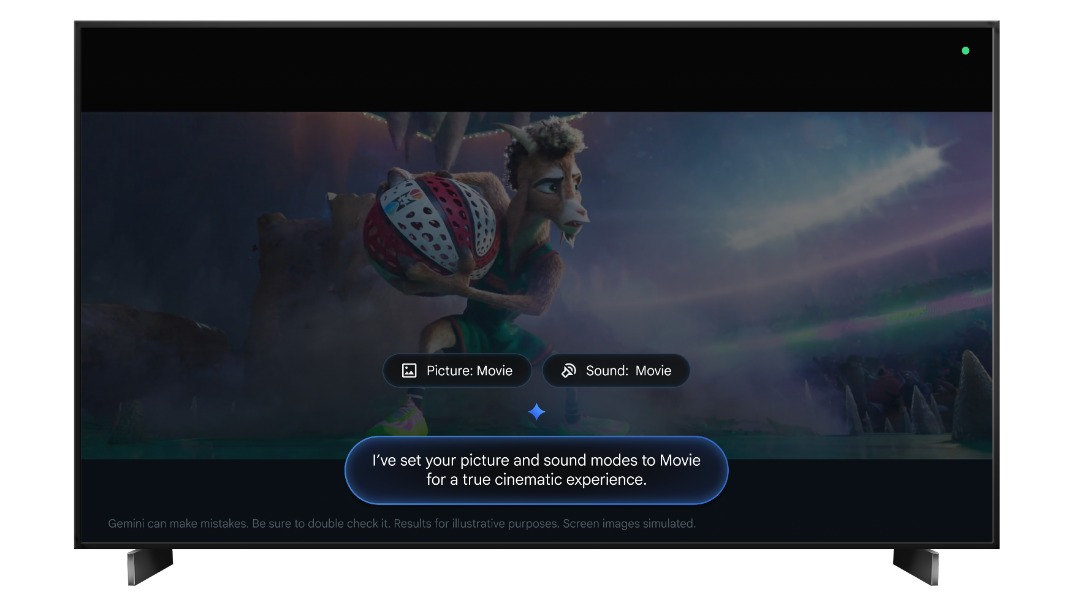
Google has integrated Gemini AI into Google TV to enable voice-controlled adjustments of picture and sound settings on select TCL Smart TVs, according to reports from Thurrott and 9to5Google. This update allows users to modify hardware configurations using natural language commands instead of manually navigating system menus.
How does Gemini control TCL TV settings?
The integration allows Gemini to act as an intelligent layer between the user’s voice and the television’s internal hardware settings. According to 9to5Google, users can now ask the AI to change specific picture or sound modes, and the system executes those changes directly on the TV. This moves beyond the traditional “app launching” capabilities of previous smart TV assistants.
Previously, Google Assistant relied on a rigid set of “intents”—specific phrases that the system was programmed to recognize. If a user deviated from those phrases, the assistant often failed or provided a web search result. Gemini uses a Large Language Model (LLM), which allows it to understand context and nuance. A user might not need to say “Change picture mode to Cinema”; they can use more natural phrasing, and Gemini interprets the intent to trigger the correct hardware setting.
Key capabilities included in this rollout involve:
- Picture Mode Adjustments: Switching between presets like Movie, Vivid, or Game mode via voice.
- Audio Tuning: Adjusting sound profiles to match the content being viewed.
- Natural Language Processing: Understanding varied phrasing to reach the same technical setting.
Which TCL models support Gemini settings control?
The feature is not available across all Google TV devices. Both Thurrott and 9to5Google specify that this functionality is limited to “select TCL Smart TVs.” Google has not released a comprehensive public list of every compatible model number, but the rollout is targeted at newer TCL hardware that supports the latest Google TV software iterations.
The limitation to select models suggests that the integration requires specific API access to the TV’s hardware abstraction layer. For Gemini to change a picture setting, Google’s software must be able to “talk” to TCL’s proprietary hardware controllers. Older models may lack the necessary firmware updates or processing power to handle these AI-driven requests in real-time.
| Feature | Standard Google Assistant | Gemini on Google TV |
|---|---|---|
| Command Style | Strict, keyword-based phrases | Natural, conversational language |
| Hardware Control | Limited (Volume, Power, Apps) | Expanded (Picture and Sound settings) |
| Processing | Cloud-based intent matching | LLM-based reasoning and execution |
| Availability | Universal across Google TV | Select TCL models (Initial rollout) |
Why is the shift from Google Assistant to Gemini significant?
The transition represents a fundamental change in how humans interact with home electronics. For years, smart TVs have functioned as app launchers with basic voice overlays. By allowing Gemini to touch the actual hardware settings—the “picture and sound”—Google is moving the AI from a surface-level navigator to a system administrator.
This development addresses a common pain point in the smart TV experience: the “menu maze.” Most modern TVs have hundreds of settings buried under several layers of menus. Finding the “Motion Smoothing” or “Bass Boost” setting often requires a manual or a long search through the UI. By delegating this to Gemini, the interface becomes invisible.
According to industry patterns observed in AI integration, this is a step toward “proactive AI.” While current commands are reactive (the user asks, the AI does), the foundation is being laid for the AI to suggest changes. For example, Gemini could eventually detect that a user is watching a dark thriller and suggest switching to a “Cinema” picture mode to enhance contrast.
What are the implications for other TV manufacturers?
The partnership with TCL serves as a blueprint for other Google TV partners, such as Sony and Hisense. If the rollout on TCL models proves successful, Google is likely to expand these deep-hardware integrations to other brands. However, this requires a high level of cooperation from manufacturers, as they must open their proprietary settings APIs to Google’s LLM.
This puts pressure on competing ecosystems, specifically Samsung’s Tizen and LG’s webOS. Both Samsung and LG have been aggressively integrating their own AI features to automate picture calibration and sound optimization. Google’s move to integrate Gemini into the OS layer allows it to compete not just on content recommendation, but on the actual quality of the viewing experience.
Potential industry ripples include:
- Standardization of APIs: A push for a more unified way for AI to control hardware across different brands.
- Hardware Bundling: Increased incentive for consumers to buy “AI-Ready” TVs that support these deep integrations.
- Software-Defined Hardware: A shift where the AI, rather than the user, becomes the primary tuner for the device.
For users interested in the broader evolution of smart home AI, a related explainer on LLM integration in IoT provides more context on how these models are moving into physical devices.
Common misconceptions about Gemini on Google TV
There is a frequent misunderstanding that Gemini replaces the entire Google TV interface. It does not. Gemini acts as an intelligence layer that sits on top of the existing Google TV OS. The visual menus and app grids remain; Gemini simply provides a faster, more intuitive way to navigate them or bypass them entirely for hardware changes.
Another misconception is that this feature is a simple “shortcut” update. Standard shortcuts (like those in Google Assistant) require the developer to map a specific phrase to a specific action. Gemini’s ability to adjust settings is based on reasoning. It understands that “Make the screen less bright” and “Lower the backlight” both refer to the same hardware adjustment, even if the exact words aren’t in a pre-defined list.
“Gemini can now control your Google TV’s settings, but only on these models,” as noted by 9to5Google, emphasizes that hardware compatibility is the current bottleneck, not the AI’s capability.
How to access Gemini settings control on supported TVs
For users with compatible TCL TVs, the feature is rolled out via system updates. There is no separate “Gemini App” to install for these hardware controls; the functionality is baked into the Google TV voice interaction system. Users can trigger the AI using the dedicated voice button on their remote or by saying the wake word.
To test if the feature is active, users can try commands such as:
- “Hey Google, change the picture mode to Movie.”
- “Gemini, adjust the sound for sports.”
- “Change the display settings to be more vivid.”
If the TV responds by opening the settings menu instead of actually changing the setting, the specific model may not yet support the deep-hardware integration, or the update has not yet reached that device.
The technical challenge of AI hardware integration
Integrating an LLM with hardware is significantly more complex than integrating it with software. When Gemini suggests a movie, it is simply querying a database. When Gemini changes a picture setting, it must send a command that the TV’s firmware understands and executes without crashing the system.
This requires a “translation layer.” Gemini processes the natural language, converts it into a structured command (e.g., SET_PICTURE_MODE = CINEMA), and then sends that command to the TCL hardware. This process must happen in milliseconds to feel responsive to the user. The fact that this is now functioning on select TCL models indicates that Google and TCL have successfully mapped the Gemini output to the TV’s internal control system.
This architectural shift is a precursor to more complex AI tasks, such as “Scene Optimization,” where the AI might analyze the on-screen content in real-time and adjust the sound and picture settings dynamically without any user input.
Comparison of AI Voice Control Evolution
| Era | Technology | Primary Function | User Experience |
|---|---|---|---|
| Early Smart TV | Basic Voice Search | Searching for titles | Frustrating; limited vocabulary |
| Google Assistant | Intent-Based AI | App launching, Volume | Predictable but rigid |
| Gemini Era | Generative AI / LLM | Hardware tuning, Contextual help | Conversational and flexible |
Frequently Asked Questions
Does Gemini work on all Google TV brands?
While Gemini is being integrated into the Google TV ecosystem, the ability to adjust picture and sound settings is currently limited to select TCL Smart TVs. Other brands may receive similar updates in the future, but it requires specific hardware-level integration from the manufacturer.
Do I need a paid subscription to use Gemini on my TV?
The basic voice control and settings adjustment features integrated into Google TV are generally part of the OS update and do not require a separate Gemini Advanced subscription, though Google may offer more complex AI features under a paid tier in the future.
Can Gemini change the volume or power off the TV?
Yes. Basic functions like volume and power have been available via Google Assistant for years. The new Gemini update expands this to include more complex internal settings like picture and sound modes.
How do I know if my TCL TV is compatible?
The easiest way to verify compatibility is to use a voice command to change a picture mode (e.g., “Change picture to Movie mode”). If the AI executes the change immediately rather than just opening the settings menu, your model is supported.
Will this feature be available on Chromecast with Google TV?
Because the Chromecast is an external dongle, it does not have direct control over the internal picture and sound hardware of the TV it is plugged into (unless the TV supports HDMI-CEC for basic functions). Deep settings control typically requires the AI to be integrated into the TV’s own operating system, as seen with TCL’s built-in Google TV.
The movement toward AI-driven hardware control marks a transition in the living room. As Google continues to refine the relationship between Gemini and device firmware, the remote control may eventually become a secondary tool, replaced by a conversational interface that understands both the content on the screen and the hardware powering it. For those following the trajectory of smart home technology, a related guide on AI-integrated home hubs explains how this fits into the larger ecosystem.
