Google Finally Brings Gemini App to Windows and Galaxy Books
Google has released a standalone Gemini desktop app for Windows 10 and 11 globally, bringing its conversational AI assistant directly to the operating system via an Alt + Space shortcut.

Google has launched a standalone Gemini desktop app for Windows 10 and 11 globally, bringing its conversational AI assistant directly onto Microsoft's operating system via a default Alt + Space shortcut and shifting the tool out of the browser tab.
The release follows months after Google introduced a similar Mac client and gives PC and Galaxy Book users a dedicated utility that sits over active applications. By invoking the hotkey, users can prompt the assistant for fact-checks, document summaries, or presentation ideas without navigating away from their current workflow, according to announcements detailed by tbreak and News.
Related YouTube video

Desktop Integration and Feature Set
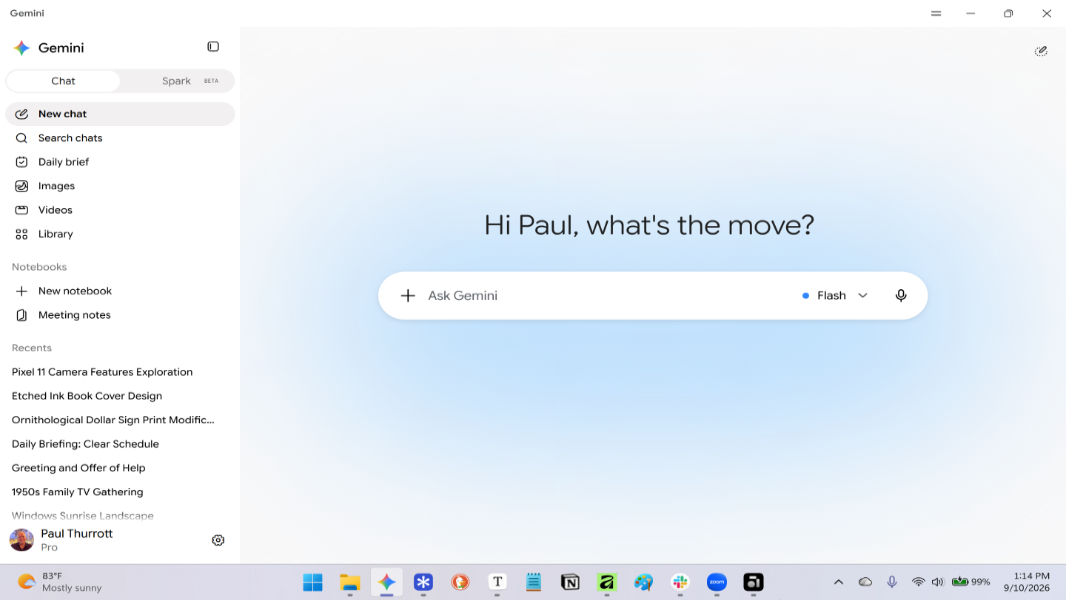
Designed to run quietly in the background without heavy system impact, the Windows client mirrors the familiar interface of the web experience. It features a centered prompt box, a model selector, a microphone button, and an expandable sidebar housing past conversations and account options, as reported by Sammyguru. Users also gain a dedicated Settings menu to manage permissions for the microphone, camera, and location, track usage statistics, handle crash reporting, and configure whether the app launches automatically upon signing into Windows.
Beyond basic text chat, the application incorporates several advanced tools. Google highlights Gemini Spark for managing multi-step agentic tasks, Connected Apps that pull information directly from Gmail and Google Drive, Nano Banana for image creation, and Gemini Omni for video generation. According to Nokia Poweruser, the client also accommodates large context windows for processing dense PDFs, spreadsheets, and developer codebases, alongside multimodal content generation.
Strategic Context and Rivalries on Microsoft's Home Turf
This launch represents a distinct strategic shift from Google's earlier desktop software release. In April, Google deployed a global desktop search app for Windows that also used the Alt + Space shortcut. However, that earlier tool prioritized local file searches, installed application lookups, Google Lens, and screen sharing rather than serving as a conversational LLM client, as noted by Cryptobriefing.
The introduction of a dedicated Gemini app places Google in direct competition with Microsoft Copilot, which enjoys deep native integration across Windows. While Microsoft holds the advantage of operating system ownership, Google is leaning on the users who already rely on Gmail, Google Drive, and the wider Workspace ecosystem. By bringing conversational AI directly to the desktop environment, Alphabet seeks to capture productivity workflows without relying solely on Chrome browser extensions or Progressive Web Apps.
| Desktop Client | Primary Focus | Default Shortcut | Ecosystem Integration |
|---|---|---|---|
| Gemini Desktop App | Conversational AI, Workspace & Media Creation | Alt + Space | Gmail, Google Drive, Notebooks |
| Google Search App (April) | Local Files, Web Search, Screen Sharing | Alt + Space | Google Lens, Local Index |
| Microsoft Copilot | OS-level Windows Integration | Varies (OS Native) | Microsoft 365, Windows Shell |
Rollout Caveats, Shortcut Conflicts, and Limitations
Practical frictions accompany the deployment. Because Alt + Space historically functions as the classic window-menu shortcut in Windows and has been claimed by various rival assistants, power users may encounter keyboard shortcut conflicts. Fortunately, Xda Developers and Thurrott point out that users can remap the trigger, select alternative presets, or disable the hotkey entirely through the application's settings.
Furthermore, feature availability is not uniform across all users. Erin Pettigrew, Director of Product Management for the Gemini App, confirmed the global release, but corporate documentation notes that advanced functions such as Gemini Spark and certain creative capabilities remain gated behind account types, age requirements, and specific Google AI subscription tiers.
Frequently Asked Questions
How do I open the Gemini app on Windows?
You can summon the app instantly over any active window by pressing the default Alt + Space keyboard shortcut, or by launching it from your installed applications.
Do I need a paid subscription to use all features?
While the basic application and global download are available for Windows 10 and 11 users, advanced capabilities like Gemini Spark and certain creative tools may require a Google AI subscription tier and compliance with age regulations.
Google has not attached a specific timeline to its roadmap, stating only that more native desktop capabilities will roll out over time for Windows users.
Macro and Multimodal Capabilities on the Desktop
The desktop client packs multimodal processing engines directly into the operating system environment. According to reporting from Nokia Poweruser, users can drag and drop dense PDFs, financial spreadsheets, inspection reports, and developer codebases directly into the interface to receive concise summaries, code refactoring, or custom data extraction. the application integrates image creation tools alongside video generation options, allowing users to build visual assets without leaving the utility window.
This Windows deployment arrives roughly seventy-two days after the debut of Gemini Spark on macOS, though News notes that Windows users do not immediately inherit certain Mac-specific features such as screen-aware gestures or long-press voice dictation via the function key.
Alphabet has previously reported hundreds of millions of monthly active users for the assistant across various platforms, positioning this release as an expansion onto the primary operating system where office workflows remain concentrated, as detailed by News and Cryptobriefing. As users adopt the tool, the next step depends on whether Google delivers the promised native capabilities and how Microsoft responds to this direct challenge on its home turf.
How significant is this development?
Contribute your assessment to the aggregated reader intelligence ledger.
Archypedia is dedicated to independent, evidence-backed reporting. This briefing was synthesized from primary source reporting, corroborated across independent newsrooms, and verified against our Editorial Standards.
Transparency record
Evidence behind this report
This report synthesizes 7 distinct sources. Open the source ledger below to compare the underlying coverage.
- sammyguru.com
- tbreak.com
- xda-developers.com
- news.ssbcrack.com
- cryptobriefing.com
- thurrott.com
- nokiapoweruser.com
Prepared under the Archypedia Editorial Policy by the Niko Vale editorial desk profile. AI-assisted tools may support drafting and verification; public accountability remains with Archypedia. Report an error.